Author Topic: Film Playback Issues  (Read 2185 times)

Offline The Fugitive

  • Plutonium Member
  • *******
  • Posts: 19204
      • Fugi's Aces Help
Film Playback Issues
« on: June 21, 2026, 11:08:26 AM »
OK, Im falling back into issue with the film viewer again.

I dropped back on my drivers going to 566.32 vs the 610.62 that is out now Along with opening films from the file manager each time I played a film I was getting decent results with playback. I would get anomalies 1 in 10-12 times I run a film. Having these anomalies popping up makes it very hard to put together a clean youtube video.

However, lately I have been having more and more issues in the film viewer. I know the game hasnt changed, windows who knows for sure. I know Nvidia changed/updated my drivers once with out me knowing and changing them back to 566 helped for a bit.

Im starting to wonder if it is some issue with Nvidia and the game/film viewer. The game runs fine. Updated to the 610 drivers yesterday and flew 3-4 hours last night with no trouble in the game other than my own inadequacies  :P So I was thinking about a radeon card. Do those computers with a radeon have the same issues in the film viewer?

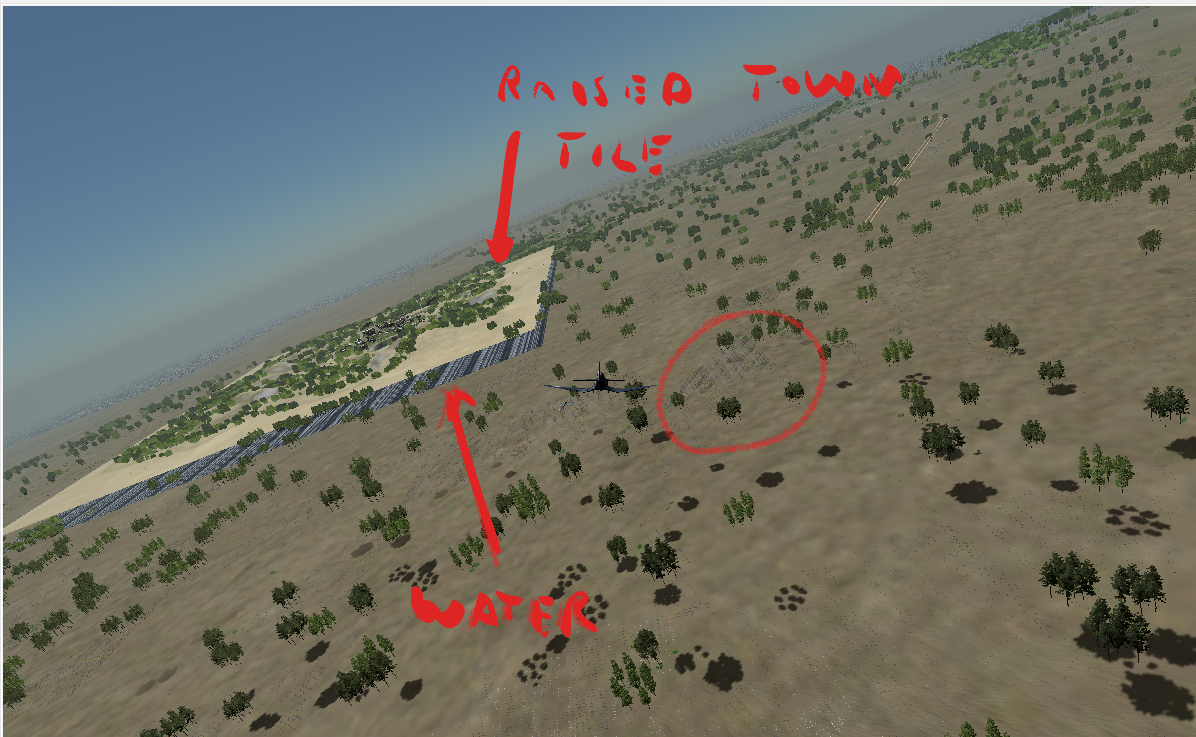
So Im asking for a bit of help here. Run through a few of your films, then report back here as to whether you have graphical issues (trees raised off the ground, town and/or base textures raised above the terrain, water looking like a ribbed curtain, squared off shorelines, brush/tree detail missing) AND which card your system is running.

Offline Animl-AW

  • Platinum Member
  • ******
  • Posts: 7661
Re: Film Playback Issues
« Reply #1 on: June 21, 2026, 12:20:17 PM »
I haven't run FV in quite a while. Since I've made a few vid tweaks.
I run in DX9 and Nvidia latest drivers.
I did not try to make a video.

I ran 5 films with various parts of terrain and sky.

To be honest, it SEEMS to be running a little better than about 6-7 months ago, on my end. Zero artifacts, very smooth....SO FAR, no weird stuff. I may make a video.

There's always been a difference between you and me on FV performance. You seem to get things worse than me.
I have seen a few of your issues, but it's less than what you run into.

We've gone around on this several times. Obviously we can't figure out the difference, yet
AH Tech Hangar
Windows Gaming Tweaks

Offline Animl-AW

  • Platinum Member
  • ******
  • Posts: 7661
Re: Film Playback Issues
« Reply #2 on: June 21, 2026, 12:36:57 PM »
Terrain and water are two different layers. If a terrain file is missing, or dips below sea level you'd see the water layer.

Going on memory of what I've seen in your errors in the past, there seems to be issue with tile(s) placement.
AH Tech Hangar
Windows Gaming Tweaks

Offline Traveler

  • Gold Member
  • *****
  • Posts: 3164
      • 113th Lucky Strikes
Re: Film Playback Issues
« Reply #3 on: June 21, 2026, 01:09:06 PM »
it's a shame that nothing is maintained.  Maps are questionable.  Having to use old outdated drivers to get older unmaintained software to work.  I stopped trying and am very close to calling it quits.  I only fly because there is one other member of 113th Lucky Strikes squad that I've flown with for 26 years in this game and until he quits I'm here, but we started looking for another game.  I Just bought a new Monitor and setting it up and Nvidia's driver manager loaded in the custom drivers for the different game I have, DCS, Arma and many others, all except Aces High, They don't have anything for Aces High and list the game as old unmaintained and outdated drivers.  I guess this is HighTech sucking out the last nickel.
Traveler
Executive Officer
113th LUcky Strikes
http://www.hitechcreations.com/wiki/index.php/113th_Lucky_Strikes

Offline Animl-AW

  • Platinum Member
  • ******
  • Posts: 7661
Re: Film Playback Issues
« Reply #4 on: June 21, 2026, 02:04:10 PM »
Immm, the issue spoken about is mostly isolated to him. It’s not global to all machines
AH Tech Hangar
Windows Gaming Tweaks

Offline nmfive

  • Zinc Member
  • *
  • Posts: 8
Re: Film Playback Issues
« Reply #5 on: June 21, 2026, 02:31:50 PM »
I almost always get this, 1st film is usually ok but if I play a few more almost always. I'm usually in a gun so that tile also shows at a weird angle relative to how the gun was pointed.

Close FV and reload the film and its ok until I load a few more.

Offline The Fugitive

  • Plutonium Member
  • *******
  • Posts: 19204
      • Fugi's Aces Help
Re: Film Playback Issues
« Reply #6 on: June 21, 2026, 03:06:22 PM »
I almost always get this, 1st film is usually ok but if I play a few more almost always. I'm usually in a gun so that tile also shows at a weird angle relative to how the gun was pointed.

Close FV and reload the film and its ok until I load a few more.

What kind of video card do you have?

Offline JimmyD3

  • Platinum Member
  • ******
  • Posts: 4988
      • Gospel Web
Re: Film Playback Issues
« Reply #7 on: June 21, 2026, 03:47:34 PM »
IF it is a Map issue, we need to know what map it is. I doubt it is a map issue, however I have seen similar errors when terrain elevations are changed and not updated properly in the Terrain Editor.
Kenai77
CO Sic Puppies MWK
USAF 1971-76

Offline Animl-AW

  • Platinum Member
  • ******
  • Posts: 7661
Re: Film Playback Issues
« Reply #8 on: June 21, 2026, 04:51:28 PM »
IF it is a Map issue, we need to know what map it is. I doubt it is a map issue, however I have seen similar errors when terrain elevations are changed and not updated properly in the Terrain Editor.

Just fyi
Battle of Britain scenario, making videos, two specific tiles were missing. Didn’t matter if I restarted FV or not. No matter how many times I viewed it, it was always the same two tiles, one being a port. Couldn’t use any of those views, no matter the angle.


AH Tech Hangar
Windows Gaming Tweaks

Offline nmfive

  • Zinc Member
  • *
  • Posts: 8
Re: Film Playback Issues
« Reply #9 on: June 23, 2026, 06:29:09 PM »
What kind of video card do you have?

Fugitive, I have an Nvidia 3080 so maybe it is something to do with it.

I record a lot of films to improve my gunnery so I've seen this hundreds of times. No particular map.

I also get frequent crashes with the FV. Can't seem to pin down any particular reason for that.

https://photos.app.goo.gl/AaBoexZAJs3UM99FA

https://photos.app.goo.gl/ZVw3ThFcoBYdrQK18

BTW how do you add an image directly into thread?
« Last Edit: June 23, 2026, 06:49:20 PM by nmfive »

Offline Animl-AW

  • Platinum Member
  • ******
  • Posts: 7661
Re: Film Playback Issues
« Reply #10 on: June 23, 2026, 06:57:05 PM »
FV will occasionally crash for various reasons.
Many times when something crashes its a memory error. The issue is not your pc. It has very low tolerance.
« Last Edit: June 23, 2026, 07:01:00 PM by Animl-AW »
AH Tech Hangar
Windows Gaming Tweaks

Offline The Fugitive

  • Plutonium Member
  • *******
  • Posts: 19204
      • Fugi's Aces Help
Re: Film Playback Issues
« Reply #11 on: June 23, 2026, 08:50:54 PM »
Im not sure how to post a picture from google server like you have. I use https://postimages.org/ a free image hosting site to upload the picture and then share it using the direct link option. Use the "Insert image" button above (just below the "BOLD" option button) and paste it between the tags.

As for the pictures, yup, I see that a lot. I have tried resetting both the video card memory (windows key+control+shift+B) and I have a program called RAMmap that clears my ram all with out waiting for a reboot. It worked a few times, but some times nothing works for me.
« Last Edit: June 23, 2026, 08:58:08 PM by The Fugitive »

Offline -gg-

  • Gold Member
  • *****
  • Posts: 2451
      • IceCreamOnMars
Re: Film Playback Issues
« Reply #12 on: June 24, 2026, 03:04:06 PM »
I called up Skuzzy and woke him up. He said "it's his sound card" and hung up.

Gina in game. Retired 11/8/26
My Band, The Jetglows
The Jetglows
Forum
Icecreamonmars.com

Offline JimmyD3

  • Platinum Member
  • ******
  • Posts: 4988
      • Gospel Web
Re: Film Playback Issues
« Reply #13 on: June 24, 2026, 05:43:22 PM »
I called up Skuzzy and woke him up. He said "it's his sound card" and hung up.

 :x You got ahold of Skuzzy???  :aok
Kenai77
CO Sic Puppies MWK
USAF 1971-76

Offline HollyWood750

  • Copper Member
  • **
  • Posts: 211
Re: Film Playback Issues
« Reply #14 on: July 05, 2026, 11:15:33 AM »
Fugi, my film viewer seems to have much worse issues when using my nvidia machine (3080) than my backup, which has an old AMD Sapphire 480 8gb card.

 :salute

HlyWd