Author Topic: Help Needed on AHIII C drive files in different locations  (Read 90 times)

Offline Max

  • Platinum Member
  • ******
  • Posts: 7997
After a desktop rebuild and fresh install of AHIII the files wound up > This PC > (C:) > Hitech Creations > Aces High III

Several weeks ago I uninstalled the game (attempt to fix Dx11 stutters) and did a fresh install from HTC homepage. Today I attempted to install the Nov 18 hitchfile.exe and got an error message about a missing dll file. I happened to notice that the AHIIIDx9.exe & AHIIIDx11.exe files were missing from the Hitech Creations/Aces High III folder. Did a search and found about AH.exe files in:
(C); > Users>Owner>APPData>Roaming>Microsoft>Windows>Start Menu>Programs>AcesHighIII

Something's not right I suspect. Shouldn't ALL the AcesH HighIII files be a sub folder of Hitech Creations?

What do I need to do to put things right? The game still loads normally but as stated, the hitch patch can't find a needed dll file which I suspect is due to files getting shuffled off to a different location.

Online The Fugitive

  • Plutonium Member
  • *******
  • Posts: 19239
      • Fugi's Aces Help
Re: Help Needed on AHIII C drive files in different locations
« Reply #1 on: Yesterday at 07:44:25 PM »
Default files are one folder deeper

C:\Hitech Creations\Aces High III\ah32

So just look for the ah32 folder and you'll find everything in there.

Online Shane

  • Plutonium Member
  • *******
  • Posts: 8497
Re: Help Needed on AHIII C drive files in different locations
« Reply #2 on: Yesterday at 08:39:11 PM »
Also, if you haven't yet, this is the new hitch test file to use for your dx11 stutters.

https://bbs.hitechcreations.com/smf/index.php/topic,413494.0.html
Surrounded by suck and underwhelmed with mediocrity.
I'm always right, it just takes some poepl longer to come to that realization than others.
I'm not perfect, but I am closer to it than you are.
"...vox populi, vox dei..."  ~Alcuin ca. 798
Truth doesn't need exaggeration.

Offline Max

  • Platinum Member
  • ******
  • Posts: 7997
Re: Help Needed on AHIII C drive files in different locations
« Reply #3 on: Today at 07:50:45 AM »
Default files are one folder deeper

C:\Hitech Creations\Aces High III\ah32

So just look for the ah32 folder and you'll find everything in there.

Opening my C drive results in this:


The AH.exe files also show up here:
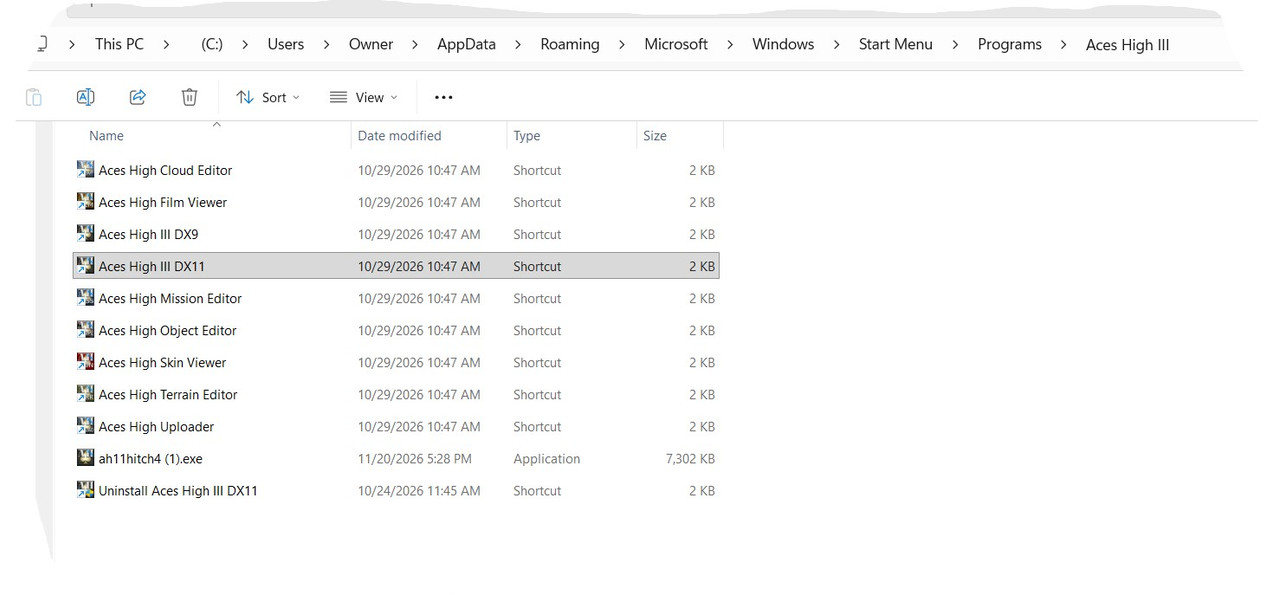

When I attempted to install the hitch patch Shane references, it warned that a missing dll file would not allow it.

It's my assumption that I have AH files scattered in the wrong places at this point. Would it make sense to save my SETTINGS folder, delete all other HTC AcesHighIII files and do a fresh install?  Sorry if this is confusing.

Online The Fugitive

  • Plutonium Member
  • *******
  • Posts: 19239
      • Fugi's Aces Help
Re: Help Needed on AHIII C drive files in different locations
« Reply #4 on: Today at 08:44:30 AM »
Opening my C drive results in this:


The AH.exe files also show up here:


When I attempted to install the hitch patch Shane references, it warned that a missing dll file would not allow it.

It's my assumption that I have AH files scattered in the wrong places at this point. Would it make sense to save my SETTINGS folder, delete all other HTC AcesHighIII files and do a fresh install?  Sorry if this is confusing.

Check your PMs.

Offline Max

  • Platinum Member
  • ******
  • Posts: 7997
Re: Help Needed on AHIII C drive files in different locations
« Reply #5 on: Today at 09:15:44 AM »
Also, if you haven't yet, this is the new hitch test file to use for your dx11 stutters.

https://bbs.hitechcreations.com/smf/index.php/topic,413494.0.html

Grabbed it and have it running. Thanks!