My last post on this, I’ve sent some info to HT, hopefully he’s amenable to taking a look

I’ve been digging more into it over the last couple of days, I just want to share what I’ve found, and it’ll be the last you hear from me on the subject.
Full disclosure, I did use some AI to write the python scripts, as I can’t coad my way out of a paper bag.
I kept going with this, as I suddenly remembered that last event I flew in SEA2, I’d mentioned to the Squad that I’d not seen any stutter, which led to the below.
TL;DR - What I did to gather this info
I used wireshark to capture 30 mins of network traffic in the MA and in SEA2 using
DX11I used wireshark to capture 30 mins of network traffic in the MA using
DX9I used a capture filter in wireshark so I only captured Aces traffic:
ip.addr == 47.190.119.209 || ip.addr == 47.190.119.207 || ip.addr ==192.168.188.35 for MA
ip.addr == 47.190.119.206 || ip.addr ==192.168.188.35 for SEA2
47.190.119.207 – GS5.hitechcreations.com (MA and SEA1)
47.190.119.209 – dlrobin.hitechcreations.com (I’m guessing from the DNS name maps, skins etc)
47.190.119.206 – GS4.hitechcreations.com (SEA2)
192.168.188.35 – My machine
Look, a graph!
Here's what the network traffic looks like, captured directly from wireshark PCAPNG files and graphed:
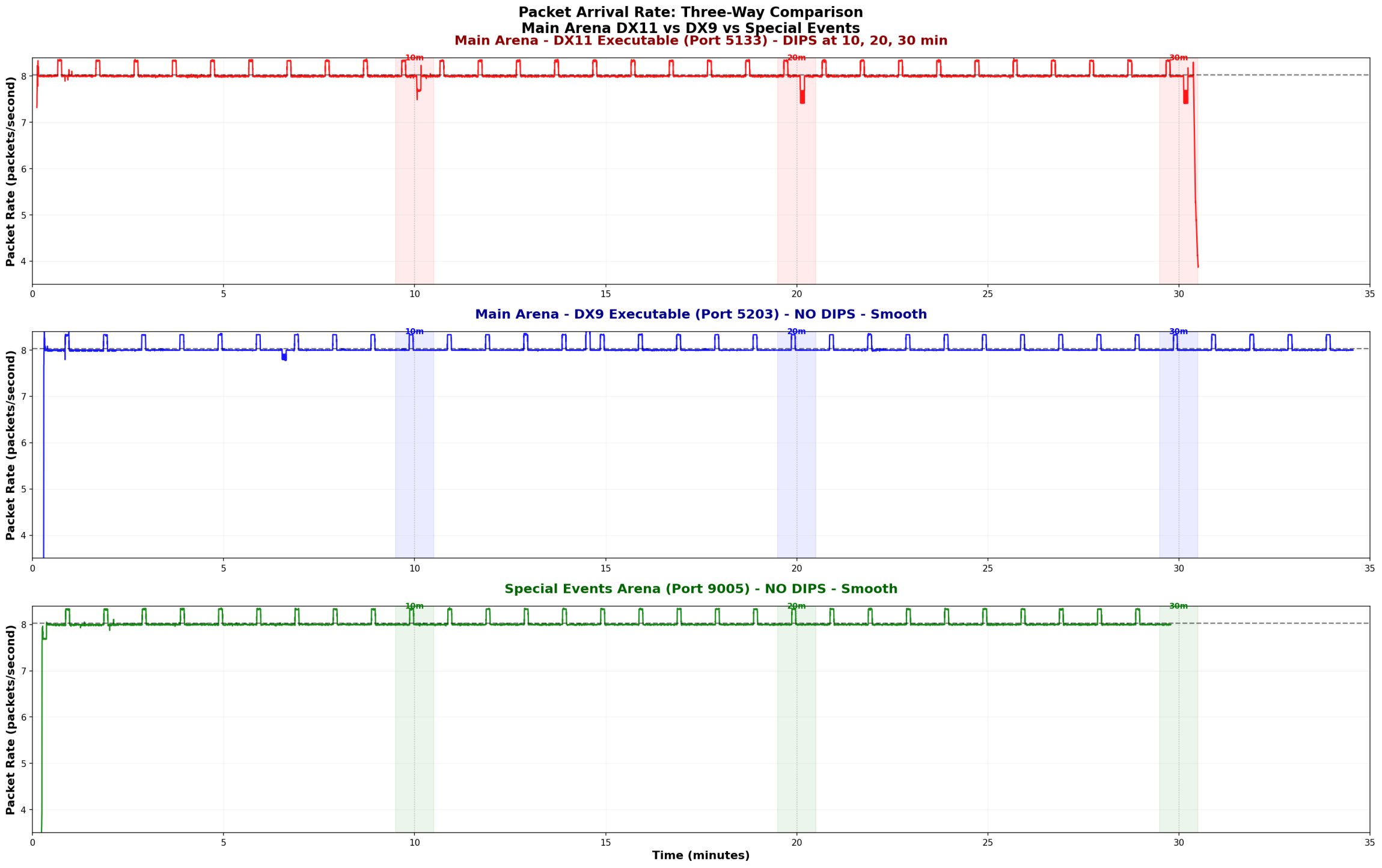
What you're seeing:
Top graph (Main Arena - RED -
DX11, most used port 5133): Clear dips in packet arrival rate at 10, 20, and 30 minutes
Middle graph (Main Arena - BLUE -
DX9, most used port 5203): Smooth packet flow throughout, no dips at those times (there is one dip, but that was me alt-tabbing)
Bottom graph (Special Events 2 - GREEN -
DX11, most used port 9005): Smooth packet flow throughout, no dips at those times
The dips represent moments when packets are delayed/spaced out more than normal, causing the freeze.
Biggest finding from this, DX9 does indeed not suffer from stutter, while it does connect to the same IP address for the MA (of course) it uses a different port to do so, the port that the DX11 exe uses is treated differently (in the firewall/proxy/load balancer/WAF) than the DX9 port is!Why I reckon There's Infrastructure in Front of the MA
Some folks have questioned whether there's actually something between us and the Main Arena servers. Here's what I think is the proof:
Public Port Scans (Shodan)
Main Arena - 47.190.119.207 – GS5.hitechcreations.com:
· Only 2 ports publicly accessible: 21, 3306
·

Special Events 2 - 47.190.119.206 – GS4.hitechcreations.com (SEA2):
· Many ports publicly accessible: 21, 2222, 3005, 3006, 3200 and more
·

Actual Ports Used (from PCAP analysis)
Main Arena
(DX11) uses:
· Port
5133: 14,568 packets (99.5% of traffic)
· Port 5110: 62 packets
· Port 3004: 8 packets (SQL, perhaps for login auth)
Main Arena
(DX9) uses:
· Port
5203: 14,568 packets (99.5% of traffic)
· Port 5110: 62 packets
· Port 3004: 8 packets (SQL, perhaps for login auth)
Special Events
(DX11) uses:
· Port
9005: 14,227 packets (99.5% of traffic)
· Port 9000: 60 packets
· Port 3004: 3 packets (SQL, perhaps for login auth)
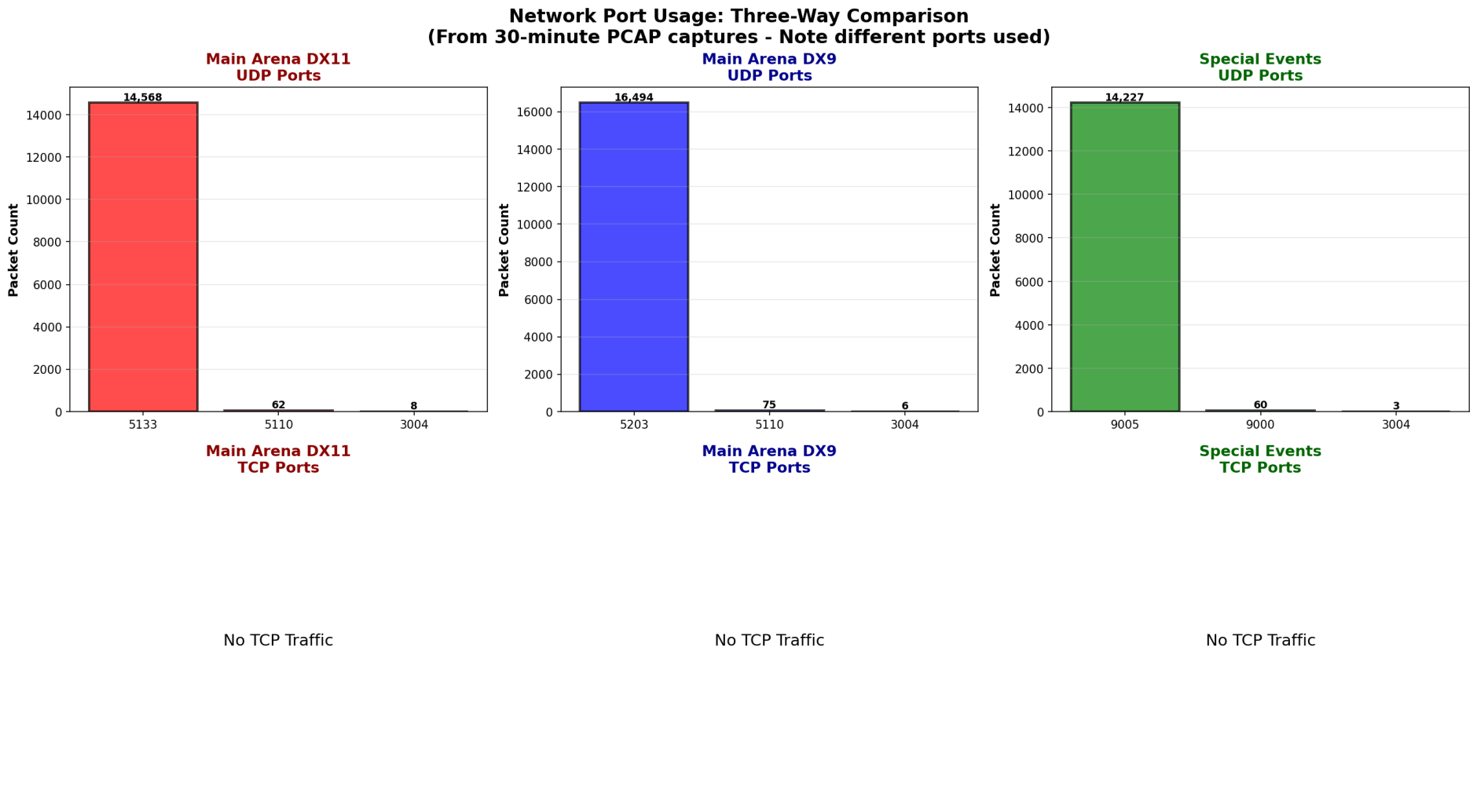 Again, the DX11 and DX9 ports are treated differently, even though they connect to the same MA IP address!
Load balancer/firewall/proxy/WAF supposition:
The majority of the Main Arena's game traffic goes to port 5133 (when using DX11), which is NOT publicly accessible according to port scans. This means there's network infrastructure (load balancer, proxy, or firewall) sitting in front of the actual game server that's handling the traffic.
Special Events 2 has a different architecture - more ports are directly accessible, and it doesn't exhibit the same timeout behavior. (SEA1 is on .207, same as MA, and also has stutter)
The Network Pattern Breakdown
Normal Operation (most of the time):
· Packets arrive every ~125ms
· Steady rate of 8 packets/second
· Smooth gameplay
At the 10-Minute Mark:
· Load balancer/firewall/proxy/WAF UDP timeout occurs
· Connection briefly stalls during reconnection
· Packets get spaced out (150-200ms instead of 125ms)
· Packet rate drops below normal (the dips in the graph)
· This is the microstutter
After the Stall:
· Connection re-establishes
· Buffered packets arrive in rapid bursts (multiple within 1-10ms)
· Game client processes burst
· Additional micro-stutter from burst processing
Why Special Events 2 Doesn't Have This Issue
The port accessibility differences and the absence of the 10-minute pattern in Special Events suggest:
1. Special Events 2 has direct server access (no load balancer timeout)
2. Different network architecture/configuration?
This is why flights in Special Events 2 feel smooth while Main Arena (and SEA1) when using DX11 has the recurring freeze.
What Can Be Done?
The fix should be straightforward for HiTech:Compare configuration for port 5133 (DX11) to configuration for port 5203 (DX9) on the MA server, 47.190.119.207, port 5203 does not have any stutterMethodology Note
This analysis was performed using:
· Wireshark/tshark for packet capture
· Statistical analysis of packet timing at microsecond resolution
· Port scanning (Shodan/nmap) to identify network architecture
All data and graphs are from actual packet captures, not speculation or subjective observation, I did however sit and watch netstatus for the whole 30 mins while doing the packet recordings, I saw the spike at 10 min intervals in the MA, totally flat netstatus in SEA2
Conclusion
The 10-minute freeze is real, measurable, and caused by network infrastructure configuration. The good news is that it's fixable with a simple timeout adjustment. The data clearly shows the difference between Main Arena when using DX11 and DX9 and Special Events 2 using DX11 (smooth).
I hope this helps the community understand what's happening and provides HiTech with the technical details needed to resolve the issue.
Happy to answer any questions about the methodology or findings!
Salute!
Steely


