Author Topic: Last post on stutter from me! - DX9 Vs DX11 differences explained!  (Read 56135 times)

Offline steely07

  • Silver Member
  • ****
  • Posts: 1967
My last post on this, I’ve sent some info to HT, hopefully he’s amenable to taking a look :)
I’ve been digging more into it over the last couple of days, I just want to share what I’ve found, and it’ll be the last you hear from me on the subject.
Full disclosure, I did use some AI to write the python scripts, as I can’t coad my way out of a paper bag.

I kept going with this, as I suddenly remembered that last event I flew in SEA2, I’d mentioned to the Squad that I’d not seen any stutter, which led to the below.

TL;DR - What I did to gather this info

I used wireshark to capture 30 mins of network traffic in the MA and in SEA2 using DX11
I used wireshark to capture 30 mins of network traffic in the MA using DX9
I used a capture filter in wireshark so I only captured Aces traffic:
 
ip.addr == 47.190.119.209 || ip.addr == 47.190.119.207 || ip.addr ==192.168.188.35  for MA

ip.addr == 47.190.119.206 || ip.addr ==192.168.188.35 for SEA2

47.190.119.207 – GS5.hitechcreations.com (MA and SEA1)

47.190.119.209 – dlrobin.hitechcreations.com (I’m guessing from the DNS name maps, skins etc)

47.190.119.206 – GS4.hitechcreations.com (SEA2)

192.168.188.35 – My machine

Look, a graph!

Here's what the network traffic looks like, captured directly from wireshark PCAPNG files and graphed:
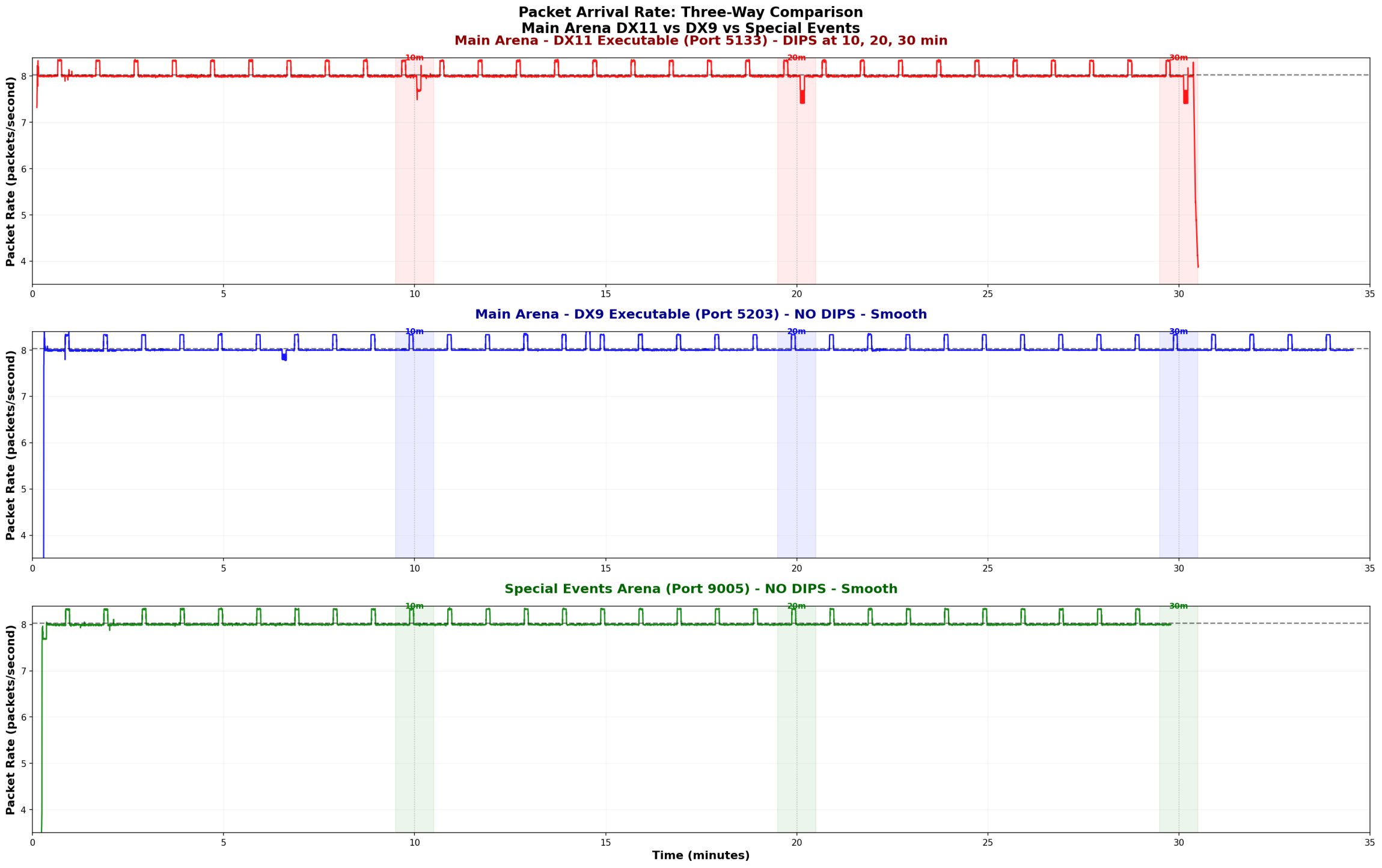

What you're seeing:
Top graph (Main Arena - RED - DX11, most used port 5133): Clear dips in packet arrival rate at 10, 20, and 30 minutes
Middle graph (Main Arena - BLUE - DX9, most used port 5203): Smooth packet flow throughout, no dips at those times (there is one dip, but that was me alt-tabbing)
Bottom graph (Special Events 2 - GREEN - DX11, most used port 9005): Smooth packet flow throughout, no dips at those times
The dips represent moments when packets are delayed/spaced out more than normal, causing the freeze.

Biggest finding from this, DX9 does indeed not suffer from stutter, while it does connect to the same IP address for the MA (of course) it uses a different port to do so, the port that the DX11 exe uses is treated differently (in the firewall/proxy/load balancer/WAF) than the DX9 port is!

Why I reckon There's Infrastructure in Front of the MA
Some folks have questioned whether there's actually something between us and the Main Arena servers. Here's what I think is the proof:
Public Port Scans (Shodan)
Main Arena - 47.190.119.207 – GS5.hitechcreations.com:
·   Only 2 ports publicly accessible: 21, 3306
·   
Special Events 2 - 47.190.119.206 – GS4.hitechcreations.com (SEA2):
·   Many ports publicly accessible: 21, 2222, 3005, 3006, 3200 and more
·   

Actual Ports Used (from PCAP analysis)
Main Arena (DX11) uses:
·   Port 5133: 14,568 packets (99.5% of traffic)
·   Port 5110: 62 packets
·   Port 3004: 8 packets (SQL, perhaps for login auth)
Main Arena (DX9) uses:
·   Port 5203: 14,568 packets (99.5% of traffic)
·   Port 5110: 62 packets
·   Port 3004: 8 packets (SQL, perhaps for login auth)
Special Events (DX11) uses:
·   Port 9005: 14,227 packets (99.5% of traffic)
·   Port 9000: 60 packets
·   Port 3004: 3 packets (SQL, perhaps for login auth)
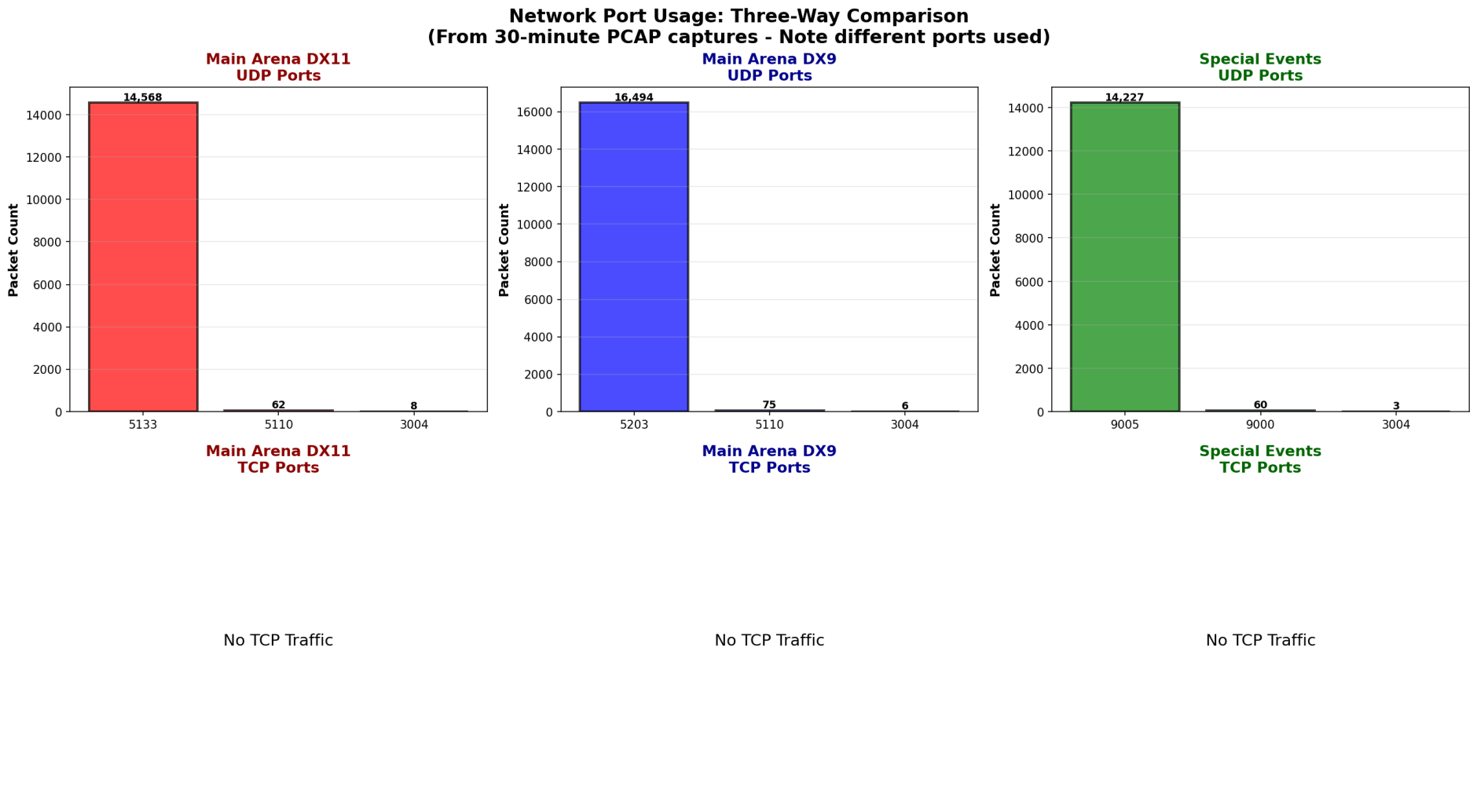

Again, the DX11 and DX9 ports are treated differently, even though they connect to the same MA IP address!

Load balancer/firewall/proxy/WAF supposition:

The majority of the Main Arena's game traffic goes to port 5133 (when using DX11), which is NOT publicly accessible according to port scans. This means there's network infrastructure (load balancer, proxy, or firewall) sitting in front of the actual game server that's handling the traffic.
Special Events 2 has a different architecture - more ports are directly accessible, and it doesn't exhibit the same timeout behavior. (SEA1 is on .207, same as MA, and also has stutter)

The Network Pattern Breakdown
Normal Operation (most of the time):
·   Packets arrive every ~125ms
·   Steady rate of 8 packets/second
·   Smooth gameplay
At the 10-Minute Mark:
·   Load balancer/firewall/proxy/WAF UDP timeout occurs
·   Connection briefly stalls during reconnection
·   Packets get spaced out (150-200ms instead of 125ms)
·   Packet rate drops below normal (the dips in the graph)
·   This is the microstutter
After the Stall:
·   Connection re-establishes
·   Buffered packets arrive in rapid bursts (multiple within 1-10ms)
·   Game client processes burst
·   Additional micro-stutter from burst processing


Why Special Events 2 Doesn't Have This Issue
The port accessibility differences and the absence of the 10-minute pattern in Special Events suggest:
1.   Special Events 2 has direct server access (no load balancer timeout)
2.   Different network architecture/configuration?
This is why flights in Special Events 2 feel smooth while Main Arena (and SEA1) when using DX11 has the recurring freeze.

What Can Be Done?
The fix should be straightforward for HiTech:


Compare configuration for port 5133 (DX11) to configuration for port 5203 (DX9) on the MA server, 47.190.119.207, port 5203 does not have any stutter


Methodology Note
This analysis was performed using:
·   Wireshark/tshark for packet capture
·   Statistical analysis of packet timing at microsecond resolution
·   Port scanning (Shodan/nmap) to identify network architecture
All data and graphs are from actual packet captures, not speculation or subjective observation, I did however sit and watch netstatus for the whole 30 mins while doing the packet recordings, I saw the spike at 10 min intervals in the MA, totally flat netstatus in SEA2

Conclusion
The 10-minute freeze is real, measurable, and caused by network infrastructure configuration. The good news is that it's fixable with a simple timeout adjustment. The data clearly shows the difference between Main Arena when using DX11 and DX9 and Special Events 2 using DX11 (smooth).
I hope this helps the community understand what's happening and provides HiTech with the technical details needed to resolve the issue.
Happy to answer any questions about the methodology or findings!
Salute!
Steely
Aces High, Wing Commander, Dickweed Heavy Bomber Group: www.dickweedhbg.com

FSO Films : https://www.youtube.com/channel/UCFs6CAXBQoVBctljybD65fA?view_as=subscriber

Offline steely07

  • Silver Member
  • ****
  • Posts: 1967
Re: Last post on stutter from me! - DX9 Vs DX11 differences explained!
« Reply #1 on: January 30, 2026, 11:41:53 PM »
Just replying as I forgot to resize the first graph so you can see all 3 spikes, and I can't edit orig post anymore

Aces High, Wing Commander, Dickweed Heavy Bomber Group: www.dickweedhbg.com

FSO Films : https://www.youtube.com/channel/UCFs6CAXBQoVBctljybD65fA?view_as=subscriber

Offline Animl-AW

  • Platinum Member
  • ******
  • Posts: 7655
Re: Last post on stutter from me! - DX9 Vs DX11 differences explained!
« Reply #2 on: January 31, 2026, 04:57:22 AM »
That’s some good stuff.

I had a feeling that spike was buffered/backup packets bursting in.

Lets assume this is correct.

Streamline tweaks/fixes could just be alleviating the burst as a bandaid.

Maybe once per night or two I notice a fast glitch, but the map is usually open. I doubt players will close it because the current icon dar is too convenient to close.

Another point, this would not explain why so many other games have the problem. So right now, local settings has yielded results.

We would never know if this is right if the change was not made to A & B a comparison.

The sad part is, even if we have it figured out, we been waiting 4-5 months for new maps to be approved. Because of a pattern, my doubts are growing about it being changed/fixed. It’s impossible to defend.
« Last Edit: January 31, 2026, 05:00:01 AM by Animl-AW »
AH Tech Hangar
Windows Gaming Tweaks

Offline hazmatt

  • Gold Member
  • *****
  • Posts: 2592
Re: Last post on stutter from me! - DX9 Vs DX11 differences explained!
« Reply #3 on: January 31, 2026, 06:51:20 AM »
Wow. Very nice sleuthing there Mr. Holmes. It looks like you've gotten it figured out.
Hope it gets fixed.

Offline Shane

  • Plutonium Member
  • *******
  • Posts: 8474
Re: Last post on stutter from me! - DX9 Vs DX11 differences explained!
« Reply #4 on: January 31, 2026, 12:41:20 PM »
Great work! 

I noticed the issue popped up around the time HTC switched over to Frontier and always felt it was related to traffic, not our cpu/gpus.  That's when I also remarked on the regular intervals in the spiking ~10mins

Hope it gets resolved.
Surrounded by suck and underwhelmed with mediocrity.
I'm always right, it just takes some poepl longer to come to that realization than others.
I'm not perfect, but I am closer to it than you are.
"...vox populi, vox dei..."  ~Alcuin ca. 798
Truth doesn't need exaggeration.

Offline Animl-AW

  • Platinum Member
  • ******
  • Posts: 7655
Re: Last post on stutter from me! - DX9 Vs DX11 differences explained!
« Reply #5 on: January 31, 2026, 01:55:34 PM »
Great work! 

I noticed the issue popped up around the time HTC switched over to Frontier and always felt it was related to traffic, not our cpu/gpus.  That's when I also remarked on the regular intervals in the spiking ~10mins

Hope it gets resolved.

Yes you did.

But, we didn’t have enough info to tie it in as a fact.

Again, many did have them before Frontier, I did. But if same settings were used >shrug>
AH Tech Hangar
Windows Gaming Tweaks

Offline steely07

  • Silver Member
  • ****
  • Posts: 1967
Re: Last post on stutter from me! - DX9 Vs DX11 differences explained!
« Reply #6 on: January 31, 2026, 02:42:24 PM »
Derp, I've mislabeled the "ports" chart, those are UDP ports of course.

Fix should be as easy as logging into whatever device is in front of the MA server, and finding where the firewall rule/load balance config is for port 5203 (DX9 traffic) and copying it over to the config for port 5133 (DX11), I'd bet a bottle of the good stuff there's a 600 second value in the 5133 config that should be removed/commented out and the issue would be solved.

I haven't had a reply to my email to HT though, I hope he sees this!

Also, on the point that other games have this, I don't disagree, however I think that's more confirmation bias, as (at least for me) when looking into it as an actual NVIDIA/DirectX issue, I naturally googled something like "NVIDIA and DX11 10 min game stutter", and of course there's a lot of results, making you think it's more common, as google is only showing you results where there IS stutter, I play a lot of other games on my AH machine, all of which use my NVIDIA card and DX11 or 12, and none of them have a consistent 10 min stutter, of course I drop frames here and there when I see a lot of action on screen, but I'm only using a 3080, and as my machine is mostly spinning drives, not NVME, I expect that to happen, Aces is different, it is on a NVME, and previously I'd maxed all graphic settings out on a 2080, and even before that on a 1080 with no issues.
« Last Edit: January 31, 2026, 02:52:05 PM by steely07 »
Aces High, Wing Commander, Dickweed Heavy Bomber Group: www.dickweedhbg.com

FSO Films : https://www.youtube.com/channel/UCFs6CAXBQoVBctljybD65fA?view_as=subscriber

Offline Vulcan

  • Plutonium Member
  • *******
  • Posts: 9997
Re: Last post on stutter from me! - DX9 Vs DX11 differences explained!
« Reply #7 on: January 31, 2026, 04:00:24 PM »
A few corrections for you.

A WAF will only support TCP traffic, and most usually only support HTTP/HTTPS protocols.

HTC will need to confirm but I don't think they do any load balancing, servers are mapped 1:1 to IPs.

You can bind multiple ports on a single IP/server. So the different UDP ports is probably a red herring.

My observations:
 - You are attributing the issue to HTC. But others (lots of others) are not having the same issue.
 - If it was an HTC infrastructure issue then EVERYONE would have this issue.
 - This would indicate the issue lies beyond HTC, either your setup or your ISP, or the client code itself (the AH DX11 game code)


Offline Shane

  • Plutonium Member
  • *******
  • Posts: 8474
Re: Last post on stutter from me! - DX9 Vs DX11 differences explained!
« Reply #8 on: January 31, 2026, 06:07:13 PM »
Yes you did.

But, we didn’t have enough info to tie it in as a fact.

Again, many did have them before Frontier, I did. But if same settings were used >shrug>

Well, tbh, none of what Dadtallica fit my experience - his was more due to computer/card issues.  I never had those. My experience occurred right around the time the ISP swap was made (which speaks to port traffic, right?)   This eliminated multiple issues, traffic/computer applying to me - narrowed it down to traffic; none of your gfx tweaks, or any of my own touched it.  I'm not savvy or motivated enough now to take deeper dives like some of you, but I know what I see/experience (don't get me started on lagbois, lol.)

So, this port thing just might be it for many of us, and I'm hoping so and it gets resolved.  But, reading Vulcan's post, it may still point to some issue at Frontier.

Maybe some of Dad's or your other tweaks help with stutter issues others experience, the most common seeming to relate with custom skins loading at vis range. 

I'm hoping one of your tweaks removes the shoreline jaggys (antialiasing issue.)
« Last Edit: January 31, 2026, 06:08:55 PM by Shane »
Surrounded by suck and underwhelmed with mediocrity.
I'm always right, it just takes some poepl longer to come to that realization than others.
I'm not perfect, but I am closer to it than you are.
"...vox populi, vox dei..."  ~Alcuin ca. 798
Truth doesn't need exaggeration.

Offline Shane

  • Plutonium Member
  • *******
  • Posts: 8474
Re: Last post on stutter from me! - DX9 Vs DX11 differences explained!
« Reply #9 on: January 31, 2026, 06:10:36 PM »
A few corrections for you.

A WAF will only support TCP traffic, and most usually only support HTTP/HTTPS protocols.

HTC will need to confirm but I don't think they do any load balancing, servers are mapped 1:1 to IPs.

You can bind multiple ports on a single IP/server. So the different UDP ports is probably a red herring.

My observations:
 - You are attributing the issue to HTC. But others (lots of others) are not having the same issue.
 - If it was an HTC infrastructure issue then EVERYONE would have this issue.
 - This would indicate the issue lies beyond HTC, either your setup or your ISP, or the client code itself (the AH DX11 game code)

The thing is, the reporting on regular, timed stutters picked up pace after the Frontier swap...  what do you think might be happening on that end?  Why is it so regular?

Surrounded by suck and underwhelmed with mediocrity.
I'm always right, it just takes some poepl longer to come to that realization than others.
I'm not perfect, but I am closer to it than you are.
"...vox populi, vox dei..."  ~Alcuin ca. 798
Truth doesn't need exaggeration.

Offline steely07

  • Silver Member
  • ****
  • Posts: 1967
Re: Last post on stutter from me! - DX9 Vs DX11 differences explained!
« Reply #10 on: January 31, 2026, 06:47:38 PM »
Look, I don't want this to devolve into an argument (and it hasn't so far), but I would like it fixed!

We know, from player reports, while a number of folks aren't having the issue (although my suspicion is they are, they're just not seeing it), a number are, enough to start 4 or 5 threads here on the issue, if this was something in a corporation I'm supporting (or you Vulcan), that's enough to make me say, "well let me see if I can replicate it"

That's simple, and will only take 10 mins, as I previously mentioned :

Log into MA using DX11 exe
When you appear at a base, open netstatus, (right click clipboard, choose net status) and start a timer (or note the time)
You (If the 10 min theory is correct) will see a spike in netstatus at the 10 min mark plus or minus 30 secs

I'm satisfied I can replicate it on 2 different machines I have here, and have done a large number of times, I even noticed it in MDStampf's latest vid : https://youtu.be/xOIHRvwATfo?t=447 about 3 or 4 secs after this timestamp

I implore anyone who doesn't think it's happening to do this, and let us know, I trust you, no need for a screenshot or anything,

Troubleshooting by just stating why you reckon it's not one thing or another isn't helping anything, Vulcan I've seen your posts over the years, and have no doubt you have the skills you've mentioned, you've been very helpful with people having technical probs in the past, I'm not sure why you're so against investigating this one, your help would be valuable!

That said, there is some resistance to replicating the issue, I asked my Squad to do this test on our Facebook group, not one of them bothered hehe

Shane, I know you're a supporter of the theory, you might have been one of the first to mention the 10 min timing, if you've got a spare 12 mins, grab a screenshot of your netstatus showing the spike, that'd get us further away from it just being my systems / in Australia etc etc.

Lets keep gathering evidence that's repeatable, and not just post about why it's probably other stuff, or not actually happening, there's enough word of mouth "evidence" to keep digging at least

Last question, I'd like to hear a theory from the doubters about why DX11 version is perfectly fine in SEA2, on the same machine that has a replicatable issue in the MA on DX11 exe?
« Last Edit: January 31, 2026, 06:50:18 PM by steely07 »
Aces High, Wing Commander, Dickweed Heavy Bomber Group: www.dickweedhbg.com

FSO Films : https://www.youtube.com/channel/UCFs6CAXBQoVBctljybD65fA?view_as=subscriber

Offline Animl-AW

  • Platinum Member
  • ******
  • Posts: 7655
Re: Last post on stutter from me! - DX9 Vs DX11 differences explained!
« Reply #11 on: January 31, 2026, 07:03:14 PM »
Well, there are a lot of variables here on both concepts.
Basically Dad's approach is in fact a streamline approach. Kinda like taking kinks out of a garden hose so the stream flows smoother. And the ones I derived from that are also good just gaming tweaks, whether you have stutters or not. I don't want to turn off Hardware Acceleration.

Also, I think there are more than one glitches or stutters happening and the answer to one may not be the answer to another, but fooling us to think it's the same one.
These tweaks can also just be making an issue to digest easier and just less noticeable, if at all. Doesn't mean it actually ceased the issue completely.
That said, my 10 min stutters are unnoticeable after making the 3 of 4, I assume gone.

Also, the connection has changed to Frontier. I've seen other ping issues with them besides what Steely describes. At times I have tracert the IP and it is smooth until it hits TX and then times-out and coughs blood, yet the game plays.
Then you have did any settings change?

Where researching with no answers from HTC.

I do have a glitch I see about once per night, and first instinct "did that just skip a few frames?" And when I read Steely's stuff it kinda does make sense, yet it's not every 10 min for me. So that makes me scratch my head.

IMO, in short, both concepts can be true, yet not tackling the same exact issue.

Quote
I'm hoping one of your tweaks removes the shoreline jaggys (antialiasing issue.)

While it works on my machine, I have other tweaks set that they may be working in unison. So try it out. If it's still jaggy then look at my Nvidia tweak page, if that's what you have. On my end AH tends to handle it very well. I see a tiny little bit, like a scratch on the tower on take off, but nothing like prior.  For whatever reason, I'm not looking that deep, AH does it better on it's own.

What's happening is a 3D environment is being projected onto a flat 2D screen. When things move pixels have issues adjusting perfectly.  The trees will have a glitter effect, that's the leaves, and some lines will have jaggies.

AH Tech Hangar
Windows Gaming Tweaks

Offline Dadtallica

  • Gold Member
  • *****
  • Posts: 2567
Re: Last post on stutter from me! - DX9 Vs DX11 differences explained!
« Reply #12 on: January 31, 2026, 08:05:36 PM »
As I stated many times, my fix was specific to my system and hardware environment. Still getting the occasional stutter just nowhere near as frequent or lengthy. I do plan to continue working on it here and there.

I think the most solid answer is going to be. It’s going to be a specific set of circumstances for everyone, even if some of those circumstances are the same for some, but not others. Most likely there is a random set of settings for machine specific to its set up and environment that will eliminate or reduce greatly the stutters. You just have to find it. Luckily, we have AI to help.
October Player Poll Results

Back in 2022 after a loooooong break from 2010. Old name Ratpack, same for the BBS. Old squads, Excaliburs, 172nd Rabid Dawgs.

Offline Shane

  • Plutonium Member
  • *******
  • Posts: 8474
Re: Last post on stutter from me! - DX9 Vs DX11 differences explained!
« Reply #13 on: January 31, 2026, 08:10:31 PM »
Look, I don't want this to devolve into an argument (and it hasn't so far), but I would like it fixed!

We know, from player reports, while a number of folks aren't having the issue (although my suspicion is they are, they're just not seeing it), a number are, enough to start 4 or 5 threads here on the issue, if this was something in a corporation I'm supporting (or you Vulcan), that's enough to make me say, "well let me see if I can replicate it"

That's simple, and will only take 10 mins, as I previously mentioned :

Log into MA using DX11 exe
When you appear at a base, open netstatus, (right click clipboard, choose net status) and start a timer (or note the time)
You (If the 10 min theory is correct) will see a spike in netstatus at the 10 min mark plus or minus 30 secs

I'm satisfied I can replicate it on 2 different machines I have here, and have done a large number of times, I even noticed it in MDStampf's latest vid : https://youtu.be/xOIHRvwATfo?t=447 about 3 or 4 secs after this timestamp

I implore anyone who doesn't think it's happening to do this, and let us know, I trust you, no need for a screenshot or anything,

Troubleshooting by just stating why you reckon it's not one thing or another isn't helping anything, Vulcan I've seen your posts over the years, and have no doubt you have the skills you've mentioned, you've been very helpful with people having technical probs in the past, I'm not sure why you're so against investigating this one, your help would be valuable!

That said, there is some resistance to replicating the issue, I asked my Squad to do this test on our Facebook group, not one of them bothered hehe

Shane, I know you're a supporter of the theory, you might have been one of the first to mention the 10 min timing, if you've got a spare 12 mins, grab a screenshot of your netstatus showing the spike, that'd get us further away from it just being my systems / in Australia etc etc.

Lets keep gathering evidence that's repeatable, and not just post about why it's probably other stuff, or not actually happening, there's enough word of mouth "evidence" to keep digging at least

Last question, I'd like to hear a theory from the doubters about why DX11 version is perfectly fine in SEA2, on the same machine that has a replicatable issue in the MA on DX11 exe?


First-ish remark about it in a sort of unrelated thread, lol... screen shots there.

https://bbs.hitechcreations.com/smf/index.php/topic,409413.msg5426124.html#msg5426124

I'll be happy to start taking more current screenshots and might even find additional older ones I didn't post.  An additional causation might be evidenced if it's traceable to the timing of the Frontier switch (May 2024) when I first noticed it and formally posted it was happening on a cyclic basis in early June. Also, for a while, many were having general connectivity issues with Frontier, unrelated to the microwarps, which might have started after a "fix" was applied to the general connectivity issue around late May, early June iirc.

Another thing is I've only noticed in flight - might have tracked it in tower a few times, but don't hold me to it... same for gv... maybe it's just less noticeable because the background scenery isn't updating as fast.
« Last Edit: January 31, 2026, 08:34:16 PM by Shane »
Surrounded by suck and underwhelmed with mediocrity.
I'm always right, it just takes some poepl longer to come to that realization than others.
I'm not perfect, but I am closer to it than you are.
"...vox populi, vox dei..."  ~Alcuin ca. 798
Truth doesn't need exaggeration.

Offline Vulcan

  • Plutonium Member
  • *******
  • Posts: 9997
Re: Last post on stutter from me! - DX9 Vs DX11 differences explained!
« Reply #14 on: January 31, 2026, 08:29:15 PM »
The thing is, the reporting on regular, timed stutters picked up pace after the Frontier swap...  what do you think might be happening on that end?  Why is it so regular?

If you change ISPs you don't typically change your equipment. Unless you have something to suggest that at the time HTC changed their route/firewall/switches as well as ISP.

It gets back to my previous comment about how their ISP and your ISP do peering, and the problem with peering is you can please most of the people all the time, but not all the people all the time.